
Personal consultation
Need help with your booking, or do you have a specific question?
+353 144 757 70
Office Hours (UTC+1)
Mon - Thu: 08:00 - 15:00
Fri: closed
Sat - Sun: closed
Payment Provider
Card transactions effected on SnowTrex are rendered secure by the Stripe payment system (www.stripe.com).
All information exchanged to process the payment is encrypted using the SSL protocol. This data can neither be detected, intercepted or used by third parties, nor is not kept on our computer systems.
Stripe is a technical service provider and does not take care of disputes linked to the orders. These should be settled directly with SnowTrex and/or your bank.
All information exchanged to process the payment is encrypted using the SSL protocol. This data can neither be detected, intercepted or used by third parties, nor is not kept on our computer systems.
Stripe is a technical service provider and does not take care of disputes linked to the orders. These should be settled directly with SnowTrex and/or your bank.
Frequently Asked Questions
Here you'll find the answers to the most frequently asked questions regarding your ski holiday. They are chronologically ordered from searching for and booking the right trip to getting there and returning home.
Index
1. Search and Book
- How do I find the perfect holiday? If you have a date in mind for your ski holiday, use the Search & Book search engine. You can narrow down your search by destination and number of people and use our various filter options. Alternatively you have the opportunity to view offers via our Holiday Topics & Travel Categories or Last Minute & Deals page. If instead you are looking for a week's party and fun on the piste for next to nothing, then you might be interested in one of our Events.
- What types of accommodations and categories are there? A detailed overview of our accommodations can be found here
- How can I book a holiday? Online Booking: After choosing your accommodation and room category, you'll be guided through the booking process.
Telephone Booking: Just give us a call. For making the booking, please have the names and dates of birth of all travellers available. - Is my data, including payment data, encrypted? We operate with the newest encrypting technology called "Secure Socket Layers" (SSL) to ensure that all your data is only transmitted in an encoded way. SSL is know to be the most secure transmitting service for the Internet worldwide. Every exchange of data between your browser and our website which may include personal details is highly encrypted and therefore secured of being lost, manipulated or subject to error. Your personal details are in safe hands with us! For further information about data security, please see here.
- Is the lift pass included? Generally the lift pass is already included in the holiday price. If you do not want a lift pass, you can usually indicate this in the booking process and your holiday price will be reduced by the cost of the lift pass. With some offers it is not possible to deselect the lift pass. Further information regarding this can be found here.
All information regarding booking amendments can be found under the point "I've already booked. Can I still book additional services?". - Is it beneficial to book ski/snowboard equipment or lessons in advance? Yes! Due to our long-term agreements with partners in the resorts you pay less for Ski and snowboard lessons and/or Equipment compared to the prices which apply locally.
- What types of reductions exist? Depending on the type of accommodation and the age of the travellers, you may receive a reduction in many accommodations - even up to 100% for children! The exact value of the reduction is shown automatically when creating a non-binding offer online or when booking. In addition, there are often discounted prices for equipment hire.
- How last-minute can I book? You can book up to one working day (Monday - Friday) before the start of a holiday, until latest 2 p.m.. Payment has to be made via bank transfer, with a card (debit or credit). From 2 weeks prior to departure we however do recommend to use a card, otherwise we will need to request proof of payment from yourself to process the bank transfer. Only after we have received valid proof of payment can we forward the required holiday information.Further information about payment can be found here.
- What does it mean to book "on request"? To book "on request" means that the room you are interested in is not in our guaranteed allocation of beds, and - after making your firm booking - the availability of the room will be requested with the accommodation. It could potentially take up to 7 working days to review the availability of the room and during this time period, you are bound to the booking. That being said, we generally receive an answer after about 3 working days. If the accommodation confirms the room, you will shortly thereafter receive your booking confirmation/invoice via e-mail.
Should the room not be available, the booking cannot take place and we will promptly inform you via telephone or e-mail. We will be glad to help you in your search for an alternative accommodation. However, you are not required to accept our alternative offer should you not wish to. - How can I redeem one or several gift vouchers? Vouchers can be redeemed according to the conditions on the voucher. The voucher number(s) can be entered into the respective box in the section of "Traveller 1", in the last step of the booking process.
There are two types of vouchers (it is identified on each voucher as to which type it is):
Voucher per person:In this case various voucher numbers can be redeemed per booking. Should the voucher value exceed the booking price, the outstanding value expires. A refund of the value is not possible.
Should you have more than one voucher to redeem, please enter the codes all in the same box in the section of "Traveller 1" (e.g. 12345, 56789, 90123,...). The first voucher code applies to traveller 1, the second to traveller 2, and so on.
Voucher per booking:Only one voucher number per booking can be redeemed. The validity may be bound to a minimum holiday price per person or per booking (as per info on the voucher).
When a voucher is only redeemable per booking, the value will always be credited to traveller 1 (lead traveller).
Last-minute or promotional discounts: If a discount is already in effect for an offer, the voucher value is reduced in accordance with the voucher conditions. The remaining amount cannot be applied to another offer and expires.
After entering the voucher number(s) and the personal details of the lead traveller, press the Redeem voucher button. A new price overview will then be displayed, taking into account the voucher reduction. To finalise your booking, click on the Book with obligation to pay button at the end.
- I've already booked. Can I still book additional services? Booking additional services (travellers, equipment hire, lessons, lift pass extension/upgrade, board - extra services dependent on the offer, see booking process) can be done either over the phone or by e-mail usually until 11:00 UK time on the day before travel (has to be a working day: Mon - Fri), provided the remaining balance is paid by credit card. In this case, the remaining amount will be automatically debited from your account. Booking additional services when paying by bank transfer can only be done up to 16 days before departure. If you originally booked the trip by bank transfer, we recommend that you first change the payment method to credit card via the payment link in your booking confirmation and then contact us.
- Can I book a two-week holiday? As the majority of our holidays are offered for 7 nights, a 2-week package booking is unfortunately not possible. However, it is possible to book two individual weeks consecutively (check the availability of both dates beforehand!). If you wish to ski on all days, please include the lift pass extension for the 7th day to the first week booking. Please inform us immediately after making both bookings, so that the bookings can be processed accordingly. As these are two separate bookings, all necessary documents are sent separately by week.
- How do I find an accommodation suitable for disabled travellers and wheelchairs? Although we welcome people with disabilities, some of our accommodations are more suitable to choose than others. Once you have entered the basic search criteria (destination | persons | travel dates | duration) and run a search, you will see the advanced search options open on the left hand side of the page. This offers the possibility to select "Wheelchair-accessible" as a criteria under the category "Accommodation facilities". The list of results will then only include such accommodations which are generally suitable for wheelchairs.
Of course, we will gladly contact your desired accommodation to bindingly request a disabled-friendly room for your travel dates. Please give us a call to inform us about such a request. - Can I book a holiday as a minor? Will I need to present a declaration of consent? If you are the lead passenger of a booking and are a minor at the time of booking, we require a written consent form from your legal guardians. Please send us the consent form, found here, as quickly as possible by e-mail as it is not possible to process your booking without it.
- For which travel dates is an early booking recommendable? Due to high demands on specific travel dates, we recommend early bookings for Christmas, New Year's, half term holidays as well as Easter.
- Can I bring my pet? After you have submitted an initial search with your desired criteria (destination | persons | dates | duration), our filter options will open on the left-hand side. These allow you to select the filter "Pets possibly allowed" under the item "Accommodation facilities". The list of results will then only show accommodation where it is generally possible to bring your pet.
Please refer to the "Pets" section of the accommodation details to find out whether pets are welcome without further action necessary or whether you must enquire with or notify the accommodation in advance. Any costs that may be incurred on site for your pet or further necessary measures are also specified there.
You can specify your pet in the last step of the booking process under "Pets". This will then be reported directly upon completion of the booking and, if necessary, the request to bring your pet along will be forwarded to the accommodation. Please ensure that your pet meets any restrictions imposed by the accommodation (e.g. "dogs only", "no listed dogs", "small animals only", "animals up to 10 kg only"). If you are unsure whether your pet fits the description, please send us the breed, size and weight of your pet immediately after booking, quoting your booking number. We will then pass on the information to the accommodation for verification. If there is no option to enter this information in the last step of the booking process, you cannot bring your own pets with you. - How does the "notification service" work? Is your favourite accommodation not yet bookable? No problem: with our free notification service, we'll notify you via e-mail - without obligation - the moment your preferred accommodation becomes available to book on our website again. Click here for more information.
2. Payment
- When and how does the payment have to be made? As soon as you receive the Booking Confirmation, a deposit payment of 25% of the total holiday price applies. The remaining amount is due 6 weeks prior to the start of the holiday. If the booking is made within 6 weeks of the start of the holiday, then the total amount is due at once.
Payment can be made by bank transfer or credit card. In your booking confirmation/invoice you will find the payment link with which you can change your payment method to credit card. Payment by bank transfer is no longer possible as of 5 days before start of the holiday.
The holiday documents can only be issued when all payments have been balanced, at the earliest however 14 days prior to the start of the holiday. - How does payment occur via bank transfer? Within a few days after booking, you will receive your booking confirmation via e-mail, of which provides the bank details and the reason for payment. Please be sure to perform your bank transfer on time.
For short-notice bookings paid by bank transfer, we require a valid proof of payment so that we can send you your travel documents in good time before the start of your trip.
Please send your proof of payment to: info-ie@snowtrex.com.
In order for proof of payment to be valid, please make sure the following are included:
- The recipient is "TravelTrex GmbH".
- The bank details (account number and sort code) for TravelTrex GmbH must be complete, correct and legible on the document – the details can be seen from your booking confirmation/invoice.
- The bank brand must be recognisable.
- The amount must be the same as the outstanding payment amount.
- Proof of payment shall not be a Word or other text document.
- There must be a notification that the transaction has taken place: e.g. screenshot from your Internet banking incl. a transaction code or a statement on paper signed by yourself, as well as stamped and signed by the bank.
- Your account balance shall not be a negative amount.
- Once you have the page on your screen then
- press the key "Print" or
- "Ctrl" and "Print" simultaneously
- Open a "Word" document and paste the screenshot into the open space by pressing "Ctrl" and "V" simultaneously.
- Save the document to a hard drive, and attach it to an e-mail for sending it to us.
After we have received valid proof of payment, we will be sending you your vouchers and holiday information from 14 days before the start of the holiday. - How does payment occur via credit card? Please have following details available for the booking:
- Bank
- Card holder
- Credit card number
- Expiration date
- CVC-code
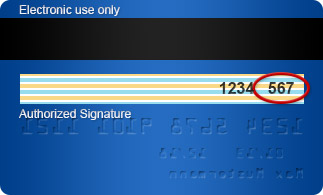
With Visa and Mastercard the CVC-code consists of the three last digits in the signature box on the back of the card.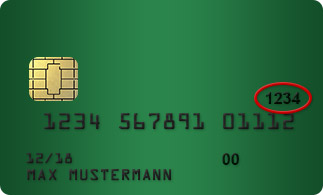
With American Express you can find the 4-digit CVC-code on the front side of the credit card above the credit card number.
Please note that when paying with American Express a fee of 3% of the total holiday price applies. Payment made with VISA or Mastercard is free of charge.
The processing of the transactions is done through our payment service provider, Stripe. Further information can be found here.Please note that as soon as you have completed your online booking, you will be charged $1.00 – this is to verify your credit/debit card. Once the transaction is completed, the amount will be immediately refunded to you.


3. Before Your Holiday Begins
- What do I have to pay attention to when travelling abroad (entry requirements, health regulations and Brexit)? Before you leave your home country, please make sure you have a valid form of ID with you (ID card or passport). A driver's licence is not considered a valid ID if you have to pass border controls.
For Irish citizens, a valid ID card is enough to bring with you when travelling within the EU.
If you are of a different nationality, have several citizenships, or are travelling outside the EU, please keep in mind that may have to apply for a visa to go on holiday. This can take a few weeks and therefore should be done as early as possible. Should you need any documentation for the visa application, please let us know.
Within the EU, there are no specific requirements to vaccinations prior to travel. However, it is nevertheless recommended to keep track of you vaccination history (in the event of an accident). Please be sure to inform yourself about the health regulations well before your travels. It is always a good idea to sort out travel insurance as to minimise the risk of high charges, should anything happen prior to, or during, the trip. Further information about travelling abroad within and outside the EU can be found here.
Some general information about travelling abroad can be found on the website of the Department of Foreign Affairs.
You can also find an overview of the entry regulations for your nationality and destination country here. - When and how will I receive the final travel documents? The travel documents will be sent by e-mail 14 days before the start of the trip. You will find the documents as a PDF document attached to the e-mail. If you do not have Adobe Acrobat Reader installed, you will find a link in the email to download the reader free of charge. If you have a My SnowTrex account, you will also find all documents and further information about your booked trip in our customer login.
The voucher for accommodation is always issued to the lead traveller only, all other booked extras to the respective traveller. All travellers are listed on the lift pass voucher. - Do I have to bring bed linen/towels? Whether your apartment is equipped with bed linen and/or towels, or whether these are available for hire in resort, can be seen in the accommodation description. Bed linen and towels are always included with hotels, pensions and gasthofs.
- How are the kitchenettes in the apartments equipped? Kitchenettes generally include utensils, pots, hob, and oven/microwave. Dish detergent and cleaning supplies - as well as toilet paper - should be brought along. Otherwise you may choose to purchase these items at the local supermarket.
- What should I take on holiday? Is there a packing list? Yes, you can review this packing list to make sure you don't forget anything: Packing list
4. Outward Journey and Arrival
- I have booked a self-drive holiday. Will I receive directions to the resort? No. With your holiday information you will also receive a link to a free route planer and you can then identify the best journey from that. If you want to begin your holiday planning earlier, you can use our website: on the respective destination page you will find a tab called "Travel info" with a map and also a link to a route planer.
- What travel possibilities are offered? An overview of the offered types of travel, as well as more exact information regarding these, can be found here.
- What is the latest that I can check into the accommodations? Generally, check-in occurs in the afternoon of the day of arrival. More specific information can be found in your final travel documents. Should you be arriving after 18:00, you are required to contact the accommodation beforehand.
- How can I use the day of arrival to the fullest? We recommend you take a walk through the resort, shop, or take advantage of local leisure activities. Those wishing to ski can purchase a full or half-day lift pass locally. In all destinations it is possible to deposit your luggage, in France sometimes for a fee.
5. In Resort
- Do I have to pay a tourist tax? In most places there is a tourist tax, which must be paid on site. As a rule, you will find information about the tourist tax under "Costs on site". If this is not the case and the tourist tax is not listed as an included service, we did not have more detailed information at the time of your booking. In this case you will receive further information upon arrival on site.
- Can I pay the apartment's deposit in cash or by credit card? It is preferred that the deposit be paid by credit card (MasterCard, Visa, American Express, Diners). However, it is also generally possible to pay with cash.
- When do I get the deposit back? Should the apartment be returned clean and without damage, the amount of the deposit will be restored to your credit card within a few days (max. up to 3 weeks). Cash deposits can be collected from the reception of your accommodation, or from your holiday rep(s) on the day of departure.
- Are ski or snowboard lessons offered? We offer ski and snowboard lessons in many of our resorts.
If lessons are not available in the booking process, you can book these at a local ski school of your choice. In many resorts we also cooperate with affiliated ski schools which give you a 5-15% reduction when you book lessons with them locally. Where we have these reductions on offer, they are displayed in the included services of the respective accommodations online. Together with your final holiday documents you will also receive a voucher, which you need to present in resort at the ski school to benefit from the mentioned reduction. - In which languages are ski and snowboard lessons offered? Besides the destination country's language, generally the lessons are also held in English.
- Where can I collect my hired equipment? You can book the equipment for the period from the day after your arrival until the day of departure. As a rule, however, you can collect your hire equipment in the afternoon on the day of arrival by handing in your voucher at the sports shop. You will find the address on your equipment voucher. If there is no exact address, but only the name of the ski hire shop, there are several shops of the same provider in the resort. In this case, you can choose which branch of the chain you want to collect the equipment from.
- What type of board is offered? You have the choice between self-catering apartments, pensions with breakfast, and hotels with half-board, full board or All Inclusive board. The corresponding type of board is found in the information on our accommodation page. Board usually starts with the evening meal on the arrival day (if half-board, full board and All Inclusive are booked) and ends with breakfast on the departure day.
- I have booked board as an additional service. Where are the meals served? You can enjoy your board (booked as an extra) in a restaurant or hotel close to your accommodation.
6. Departure and Return Journey
- When is check-out? Check-out generally occurs on the morning of the departure day around 10:00. You will receive more detailed information with your travel documents and at your accommodation.
- Can I ski on the day of departure? Should you wish to ski on the day of departure, with many of our offers you have the opportunity to extend your lift pass (for a small fee) at the time of booking online. You only need to select "7 days lift pass" during the booking process. You can also contact us via e-mail or telephone up to 1 p.m. (Mon - Fri) on the effective day before travel, or you can do so - at a greater charge - in the resort. Your luggage can be deposited in your accommodation (sometimes for a fee). In a few accommodations it is possible to shower after skiing (sometimes for a fee).
7. Cancelling the Holiday
- How can I cancel my booked holiday? You may withdraw from your holiday at any point before the start of the holiday. Cancellation requests must be made by the lead passenger and should be made in writing (e-mail). Cancellation fees will apply as described in our Booking Conditions (point 4). Further information can be found here.
Do you want to cancel your entire booking? The current cancellation fees, as well as the option to cancel the entire booking yourself can be found in your personal My SnowTrex Customer-Login.
To inquire about conditions for partial cancellations, substitutes or re-bookings, or for any other questions regarding cancellation, please email us with your booking number cancellation-ie@snowtrex.com or via the contact form in your personal My SnowTrex Customer-Login.
Please note that cancellations by e-mail/contact form can be accepted from Monday to Friday during our office hours. If the cancellation is received after our closing time, the following working day (Mon - Fri) is decisive for the time of cancellation. - How can I avoid cancellation fees? Booking our Flex-Option allows you to easily cancel your booking or accommodation unit(s) once, free of charge, or to rebook at current prices, up to 32 or even 16 days before arrival. Here you will find all information about the Flex-Option.
If you provide a replacement person to take your place at the same time as your cancellation, it is possible to rebook the participants (possibly for a rebooking fee). The accommodation and board (as booked) will be transferred to the new substitute traveller, as well as the other services as a rule. Please note that it may no longer be possible to rebook at short notice.
If you have not booked the Flex-Option and you would like to change your travel date or destination, please see here for all the information about our rebooking options.
We recommend that you also book a travel cancellation insurance (through a third party). Although booking the insurance does not allow you to cancel free of charge, the insurance will reimburse you the full cancellation costs (minus a small deductible) if you have to cancel the trip before departure for an insured reason (e.g. illness). The cancellation costs can otherwise amount to up to 90% of the holiday price. - Can I amend my booked holiday (regarding date or place)? All information about booking amendments can be found here.
If you would like to request an amendment for a specific booking, please contact us via e-mail, with reference to the booking number, under cancellation-ie@snowtrex.com. - Does it make sense to book travel insurance (incl. cancellation insurance)? Travel insurance (incl. cancellation insurance) is so important that we strongly recommend taking out such an insurance.
It protects you from the cancellation fees that incur, should you be unable to go on the holiday due to insured reasons, such as e.g. illness. As cancellation fees can be up to 90% of the holiday price, it is wise sorting out insurance coverage in due time before the start of the trip. - How do I make a claim on my travel insurance (incl. cancellation insurance)? If you have taken out travel insurance (incl. cancellation insurance) and then have to cancel the holiday due to an insured reason, you must contact the insurance provider directly (not TravelTrex) to file a claim so as to be reimbursed the cancellation fees.
If you have a private travel insurance, please ensure you have the contact details with you on holiday in case of an emergency. These can be usually be found on your insurance policy. The insurance company will tell you which documents you need to submit (e.g. cancellation invoice, medical certificate). Please remember that a claim must be reported immediately. You can also submit a claim directly online on the insurance company's website. You can find all the important information required for smooth processing of the cancellation or curtailment of your trip in the insurance policy.
8. Refer a Friend Programme
- What is the idea behind SnowTrex's Refer a Friend programme? Did you book a great ski holiday with SnowTrex? Then share your joy and benefit twofold.
For every successful recommendation, SnowTrex thanks you with a substantial discount on your next ski holiday.
Your referred friends will automatically receive a €60 discount on their first booking. - How do I benefit from referring friends? For each successful referral, you will receive 5% of your friends' holiday price in the form of a voucher that you can use for your own next ski holiday booking. You will receive the discount voucher by e-mail once your referred friends have completed their holiday.
Example: If the holiday of the referred new customers has a value of €2,000, the referrer, i.e. you, will receive a voucher worth €100 for your next holiday with SnowTrex.
In general, the more friends you refer, the cheaper your next winter holiday will be – it could even be free! - Who can refer whom - and how does it work? The prerequisite is that the referrer is already a SnowTrex customer.
Anyone who is not yet a SnowTrex customer can be referred.
Our Refer A Friend Programme page provides you with a detailed description on how the referral of friends and family works.
A maximum of 8 friends can be referred per season. If more friends are to be referred, we are, of course, happy about this. However, a trade licence will then be required for tax reasons. - When and how will the voucher be sent? After your referred friend's holiday has been completed, you will receive a discount voucher with a corresponding voucher code via email.
Should several friends have been referred, the value of the voucher will continue to increase until it is redeemed for your next booking with SnowTrex. - Where and how can the voucher be redeemed? The voucher can be redeemed on the SnowTrex website during the online booking process for your next holiday. While making the booking, you can enter the voucher code in the corresponding field. The value of the voucher will be automatically subtracted from the total holiday price.
Should the value of the voucher exceed the total holiday price, your holiday will be free of charge.
Please note that the voucher cannot be combined with other vouchers or specials deals. Attempting to redeem the voucher after the booking has been made is also not possible. Further terms and conditions can be seen on the voucher. - How long is the voucher valid for? The voucher is valid within the same season in which the new customer travels, and during the entire following season.
- Where can I see the current balance of my voucher? Where can I see how many friends I have referred? After the completion of each referred friend's holiday, you will automatically be sent an email with the voucher and its current balance.
If more than one friend has been referred, the existing voucher value will be increased until you redeem the voucher for your next booking with SnowTrex. - Where can I find the link to refer my friends? On our Refer a Friend Programme page, you'll find an input field. Simply enter your e-mail address and we'll subsequently send you your personalised referral link.
- My friend forgot to click the personalised referral link before making their booking. Is it still possible to receive commission for this booking? No, unfortunately this is not possible.
The referred friend must book via the personalised referral link on our website www.snowtrex.co.uk in order to automatically assign the holiday to you.
9. General Questions
- What is the Best-Price-Guarantee? If you find a better price for the same holiday (with the exact same availability and included services) with a different tour operator, please e-mail this offer to us via bestprice-ie@snowtrex.com, before or latest on the day of making the booking. We will not only match that price but better it by €10 per booking. Not valid when subsequently rebooking the holiday and it cannot be combined with Holiday Voucher.
Nevertheless, we are convinced that you won't find a better cost-benefit ratio! - What is the Snow Guarantee? If all ski areas that are included in the booked lift pass are not open due to a lack of snow five days before the start of your holiday (effective day of arrival), and providing the highest point of the ski area measures at least 1,900 m altitude, you have the opportunity to change your booking to a different holiday for the same dates without extra charges (subject to availability of free rooms, current prices without Last-Minute & Deals discounts apply for the new holiday, valid for holidays with arrivals from 1st of January to 15th of March).
To make use of our Snow Guarantee, please contact us 5 days before the start of your holiday (e.g. Monday, if arrival day is Saturday) via e-mail at snowguarantee-ie@snowtrex.com. - What are the accommodations that are called "Breakfast Pension plus resort name"? Should the property you are interested in have no specific pension name, but rather is called "Breakfast Pension + resort name", this generally means that you will first receive the specific details regarding your accommodation at the tourist centre in the resort. Our "Breakfast Pensions" are pensions in the village offering bed & breakfast, and cosy rooms with bath or shower/wc. We cannot guarantee that groups will be housed in the same property.
- What does "value price" mean when combined with a room/accommodation name? A few accommodations/rooms appear twice in the accommodation overview, once with "value price" and once without. Provided the room description is identical, we can offer you the same room at an especially low price. The two accommodation listings are of equal quality. Therefore, we recommend that you always check availability in the "value price" accommodations first. More information about searching for available rooms can be found here.
- What do the abbreviations SC, BB, HB, FB, AI and shower/wc mean? SC = self-catering
BB = accommodation & breakfast
HB = accommodation & half-board (breakfast + evening meal or breakfast + lunch)
FB = accommodation & full board (breakfast + lunch + evening meal)
AI = All Inclusive (exact services: see accommodation description)
shower/wc = room has an ensuite bathroom with shower and wc
bath/wc = room has an ensuite bathroom with bath and wc - What is Crazy Booking Night? For our Crazy Booking Night, we have specially reduced offers online, but only for the mentioned date and duration. The reductions are always only valid for the advertised holiday dates, e.g. for pre-season or late season, or for specially selected destinations and they are already included in the offer price you see online during Crazy Booking Night.
Bookings can only be submitted during Crazy Booking Night and only as long as the supplies last. Our Best-Price-Guarantee is of course also included with these reduced deals.
As to be updated about the date and time of each Crazy Booking Night, we recommend subscribing to our newsletter, which can be done here. You will also find information about our Crazy Booking Nights on our social media platforms. - Can I buy a SnowTrex gift voucher? How can it be redeemed? Yes, you can purchase gift vouchers for SnowTrex trips here:
Purchase gift voucherHere's how the voucher redemption works at SnowTrex:
- Book your trip on snowtrex.ie and select "bank transfer" as the payment method to avoid the entire travel price being collected and the voucher no longer being redeemable. You will then immediately receive a copy of the online booking with your booking number.
- Please forward this booking number, together with your voucher, to info-ie@snowtrex.com. Shortly afterwards you will receive an automatic payment confirmation for the value of the voucher.
- When you receive the booking confirmation/invoice with the adjusted value, pay the remaining amount shown there. If you wish, you can change the payment method to credit/debit card via the payment link.
- Validity of the voucher: 3 years from the date of issue.